
Your smart home devices are only as smart as the installation behind them. You can buy the most advanced thermostat or video doorbell on the market, but if the wiring is wrong, the mounting is sloppy, or your WiFi signal drops every other day, that investment quickly becomes a source of frustration rather than convenience. Houston homeowners know this feeling well.
You’re not alone if you’ve stared at a box of smart devices wondering who you can actually trust to get everything set up correctly without overcharging you. Professional smart home device setup in Houston isn’t just about plugging things in. It’s about getting the electrical foundation right, securing clean and safe mounting, and making sure every device talks to every other device the way it’s supposed to.
This guide walks you through what a professional installation actually involves, why the physical setup matters just as much as the technology itself, and how to identify a qualified local technician who handles both the electrical work and the finishing details, like drywall patching, so your home looks as good as it functions when the job is done.
Key Takeaways
- Professional smart home device setup Houston homeowners can rely on goes beyond plugging devices in — it covers safe electrical integration, clean mounting, and proper network configuration that keeps every device reliably online.
- Houston’s climate puts unique demands on smart thermostats and HVAC-connected devices, making correct power supply and compatibility checks essential before installation begins.
- DIY installations frequently result in devices that drop off the network, exposed wiring, and damaged drywall — problems that cost more to fix than a professional setup would have cost upfront.
- Your home’s electrical panel and WiFi infrastructure need to be evaluated before adding smart devices, since underpowered or congested networks are the leading cause of automation failures.
- Working with a local provider who handles both the electrical work and finishing details like drywall patching means your home looks exactly as it did before — only smarter.
Why Professional Smart Home Setup is Essential for Houston Homeowners
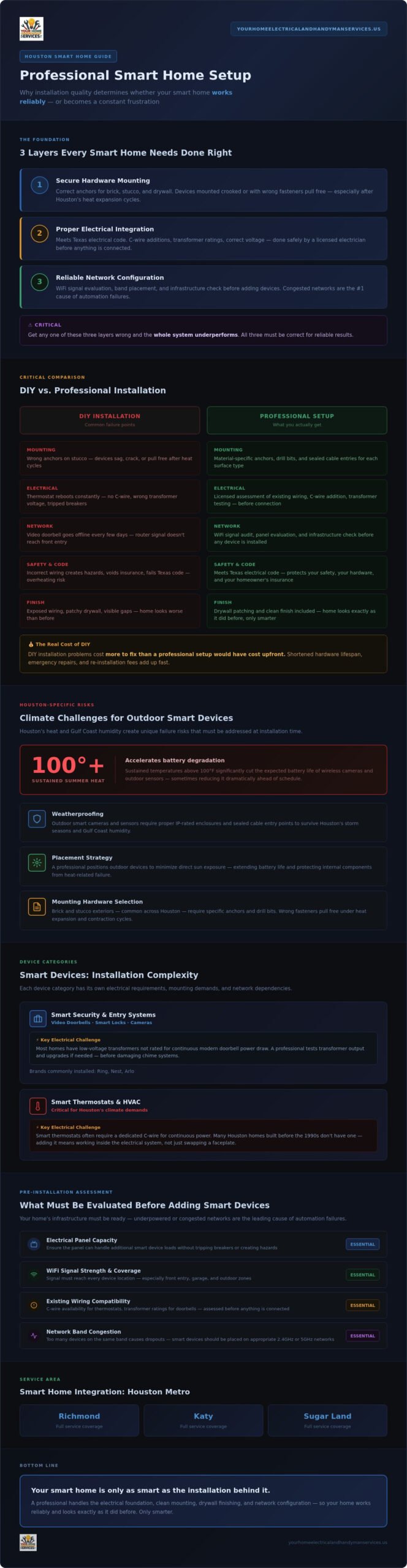
Home automation systems have become genuinely sophisticated, and that sophistication is exactly what makes installation more demanding than most homeowners expect. Professional smart home setup isn’t simply about following the instructions in the box. It covers three distinct layers: secure hardware mounting, proper electrical integration, and reliable network configuration. Get any one of those wrong, and the whole system underperforms.
DIY installations fail most often in predictable ways. A device mounts crooked or pulls away from the wall because the wrong anchors were used on stucco. A smart thermostat reboots constantly because the existing wiring can’t deliver consistent power. A video doorbell goes offline every few days because the router signal doesn’t reach the front entry. These aren’t minor inconveniences. They shorten the lifespan of your hardware and erode the confidence you had in the technology in the first place.
Working with a licensed technician for smart home device setup in Houston also means your installation meets Texas electrical code requirements. That matters both for your safety and for your homeowner’s insurance. A device wired incorrectly into an older electrical system isn’t just unreliable; it can create a genuine hazard.
The Safety Factor: Beyond the App
Smart thermostats often require a dedicated C-wire to maintain continuous power, and many Houston homes built before the 1990s simply don’t have one run to the thermostat location. Adding one means working inside the electrical system, not just swapping a faceplate. Smart doorbells present a similar challenge: they rely on low-voltage transformer wiring that must be correctly rated for the device or risk damaging both the doorbell and the existing chime system. A licensed electrician brings the knowledge to assess your existing wiring before anything gets connected, not after something stops working.
Improper voltage connections in older homes can also cause devices to overheat, trip breakers, or fail prematurely. That’s a risk no app tutorial can help you avoid.
Local Climate Considerations: Heat and Humidity
Houston’s summers are genuinely punishing for outdoor smart devices. Sustained heat above 100 degrees accelerates battery degradation in wireless cameras, sometimes cutting expected battery life significantly. Gulf Coast humidity adds another layer of risk, particularly for devices mounted under eaves or near irrigation zones.
- Weatherproofing matters: Outdoor smart cameras and sensors need proper IP-rated enclosures and sealed cable entry points to handle Houston’s storm seasons.
- Mounting hardware selection: Brick and stucco exteriors common across the Houston area require specific anchors and drill bits. The wrong fastener pulls free under the weight of a camera, especially after repeated heat expansion and contraction cycles.
- Placement strategy: A professional will position outdoor devices to minimize direct sun exposure, extending both battery life and the longevity of the unit’s internal components.
Getting these details right from the start is what separates a smart home that works reliably from one that needs constant attention.
Key Smart Devices We Install: From Security to Climate Control
Not all smart home devices present the same installation challenges, and treating them as if they do is exactly where DIY projects go sideways. Each category of device has its own electrical requirements, mounting demands, and network dependencies. Understanding what’s actually involved in a proper setup helps you make informed decisions before anything gets mounted to your walls.
Smart Security and Entry Systems
Video doorbells from Ring, Nest, and Arlo are among the most popular smart home upgrades Houston homeowners request, and they’re also among the most frequently installed incorrectly. The core issue is chime integration. Most homes have an existing mechanical chime powered by a low-voltage transformer, and many of those transformers aren’t rated to handle the continuous power draw of a modern video doorbell. A professional installation includes testing transformer output and upgrading it when necessary, so your existing chime keeps working rather than humming, buzzing, or going silent entirely.
Smart locks require a different kind of precision. Deadbolt alignment has to be exact. Even a few millimeters of misalignment creates enough resistance that the motor strains on every lock cycle, shortening the motor’s life considerably. Getting this right means checking door frame tolerances and adjusting the strike plate position before the lock is ever programmed.
Security camera placement is equally deliberate. The goal isn’t just coverage; it’s coverage that minimizes false motion alerts triggered by passing cars, swaying trees, or shifting shadows. A trained installer sets camera angles and adjusts motion detection zones during setup, saving you from constant notifications that train you to ignore the system.
Climate and Energy Management
Smart thermostats like the Nest and Ecobee are genuinely effective at reducing energy costs, but only when they’re configured to match your specific HVAC system. Houston homes often run multi-stage cooling systems or variable-speed air handlers, and a thermostat that isn’t properly mapped to those stages won’t deliver the efficiency gains it promises. Installation includes verifying compatibility, correctly labeling every wire terminal, and running the initial calibration sequence so the thermostat learns your home’s actual thermal characteristics.
Smart switch installation extends the same level of control to ceiling fans and outdoor lighting circuits. These switches replace standard toggles and require a neutral wire connection that older wiring configurations sometimes lack. Addressing that correctly is part of what professional smart home device setup Houston technicians handle before the switch ever gets its faceplate installed. For homeowners interested in expanding beyond switches into full lighting upgrades, professional lighting installation services cover the broader scope of recessed lighting and dimmer integration that pairs naturally with smart home systems.
- Nest and Ecobee thermostats: Require system compatibility checks and correct multi-stage wiring before any programming begins.
- Smart switches and dimmers: Neutral wire availability must be confirmed at the switch box; older homes frequently need an assessment before installation is possible.
- Outdoor lighting circuits: Smart control of exterior lighting adds both security and energy management without requiring new fixture runs when existing wiring is adequate.
Every device category above connects back to the same principle: the hardware is only as reliable as the installation behind it. If you’re ready to get these systems set up correctly the first time, schedule your smart home installation with a licensed local technician who handles both the electrical work and the finishing details.
DIY vs. Professional Smart Home Installation: Avoiding Common Pitfalls
The appeal of DIY smart home installation is understandable. The box makes it look straightforward, and YouTube tutorials make it look faster. What neither shows you is what happens three weeks later when the device stops appearing in your app, the wall behind the mount is cracked, or your manufacturer warranty has quietly been voided.
These aren’t edge cases. They’re the predictable outcomes of installations that skip the technical groundwork that professional smart home device setup Houston technicians handle before anything gets mounted.
Common Technical Roadblocks
The “ghost device” problem is one of the most frustrating DIY outcomes. A device installs cleanly, connects to the app, works for a few days, then disappears from the network entirely. The culprit is almost always one of three things: insufficient power delivery, a WiFi dead zone, or a firmware conflict that wasn’t resolved during initial setup.
- Underpowered doorbell transformers: Older homes in Katy frequently have transformers rated at 10VA or less, well below the 16VA or higher that modern video doorbells require for stable operation. The device appears to work initially, then drops off or delivers choppy video because it’s starved for consistent power.
- WiFi dead zones: A router positioned in a back bedroom doesn’t reliably reach a front entry or a detached garage. Smart home devices need a stable signal, not just an occasional one. A professional installation includes evaluating your existing network coverage and, where needed, integrating a mesh network node to eliminate the gap rather than hoping the signal stretches far enough.
- Firmware and configuration hurdles: Many devices require firmware updates before they’ll connect reliably to current app versions. Skipping this step during setup, which is easy to do when following a quick-start guide, creates connectivity issues that look like hardware failures but are actually software problems.
Hardware Mounting and Aesthetics
Brick, stone, and high eave mounting are where DIY installations most visibly fall apart. Standard drill bits won’t cut cleanly through masonry, and the wrong anchor pulls free under the weight of even a modest camera. Exposed wiring left running across a wall face is the other common outcome, one that affects both the appearance of your home and the longevity of the cable itself.
A professional handles wire concealment as part of the installation, not as an afterthought. When running a new cable path requires cutting into drywall, having access to a handyman for drywall repair as part of the same service means the wall is patched and finished before the job is considered complete. Your home looks exactly as it did before, only with a properly mounted, cleanly wired device on the wall.
Warranty protection is another practical reason to go professional. Most manufacturers specify that damage resulting from improper installation isn’t covered. An incorrect voltage connection or a stripped mounting point documented in a warranty claim is grounds for denial. Fixing a DIY mistake after the fact, including replacing a damaged device and repairing the wall, consistently costs more than a professional setup would have from the start.
Preparing Your Home’s Infrastructure for Seamless Automation
Smart devices don’t fail in isolation. When a thermostat drops off the network or a camera stops recording, the problem usually traces back to something behind the wall or inside the utility closet, not the device itself. Before any smart home device setup Houston homeowners invest in can deliver consistent results, the underlying infrastructure has to be ready to support it.
Electrical Panel Readiness
Adding a handful of smart switches and sensors won’t stress most electrical panels. But a fully automated home, with EV chargers, smart appliances, motorized shades, and multiple always-on hubs, creates a cumulative load that older panels weren’t designed to handle. A 200-amp service provides the headroom modern smart homes actually need, giving you room to add devices over time without tripping breakers or running circuits at capacity. Homes still operating on 100-amp service in areas like Richmond may find that an electrical panel upgrade in Richmond TX is the right first step before any smart home buildout begins.
High-draw smart appliances, including EV chargers and whole-home backup systems, require dedicated circuits. Sharing a circuit with other loads introduces voltage fluctuations that cause devices to reset, log errors, or simply go offline. A licensed technician will identify which devices need their own dedicated run before installation starts, not after something trips.
WiFi and Connectivity Optimization
Network congestion is one of the most overlooked causes of smart home failures. Most devices operate on the 2.4GHz band because it travels farther and penetrates walls more effectively. The tradeoff is that 2.4GHz is also the most crowded frequency in a dense neighborhood. Devices that support 5GHz, including many newer hubs and streaming cameras, should be assigned to that band where possible for faster, less congested throughput.
- Hub and bridge placement: Positioning your smart home hub centrally, rather than tucking it behind a TV or in a closet corner, meaningfully extends its effective range to connected devices throughout the home.
- Mesh network nodes: A single router rarely covers a detached garage, a rear gate, or a long driveway. Mesh nodes placed strategically eliminate dead zones rather than working around them.
- Signal testing at the perimeter: A professional installation includes walking the property with a signal meter to confirm coverage reaches every outdoor camera location before mounting hardware goes up.
Future-proofing deserves deliberate planning too. Running conduit or pulling an extra low-voltage cable during a current installation costs very little compared to reopening walls later when you add devices in 2027 or beyond. It’s the kind of detail a thorough installer addresses upfront.
If you want your electrical panel and network infrastructure evaluated before your devices go in, connect with a licensed local technician who handles the full scope of smart home device setup Houston properties require, from the panel to the finished wall.
Reliable Smart Home Integration Services in Richmond, Katy, and Sugar Land
Finding a technician who handles both the electrical side and the finishing details isn’t as straightforward as it should be. Most aggregator platforms connect you with a pool of generalist handymen who may have installed a smart lock once or twice. What you actually need for smart home device setup Houston properties require is a licensed professional who knows the specific wiring configurations, exterior materials, and network conditions common to homes in Fort Bend County and the surrounding communities.
Your Home Electrical and Handyman Services LLC is locally owned and has been serving Richmond, Katy, Sugar Land, and Rosenberg since 2021. That local footprint matters. Technicians who work regularly in these communities understand the construction styles, the age of the electrical systems, and the outdoor conditions that affect device performance in ways that a national platform simply can’t replicate.
Local Expertise You Can Trust
Every technician is licensed and insured, covering the full scope of what a proper smart home installation actually involves: electrical integration, secure hardware mounting, network configuration, and drywall patching when a cable run requires it. There’s no need to coordinate a separate contractor to close up a wall after the job is done.
The scope of work is flexible too. Whether you need a single video doorbell installed correctly or a full-home setup covering thermostats, smart switches, security cameras, and entry systems, the service scales to match your project. No job is treated as too small to do properly.
- Licensed and insured technicians handling both electrical work and finishing details under one appointment.
- Flat-rate and project-based pricing with no hidden fees added after the work is complete.
- Clean workspaces as standard practice, not as a courtesy — your home is left the way it was found, only with everything working.
The process starts with a straightforward consultation to review your device list, assess your existing electrical panel and WiFi coverage, and confirm compatibility before anything gets ordered or mounted. From there, the installation moves in a logical sequence: electrical groundwork first, hardware mounting second, network configuration third, and a full device walkthrough at the end so you know exactly how everything operates before the technician leaves.
Book Your Smart Home Setup Today
Getting a quote is simple. Have your device list ready along with your WiFi network name and password, and log into any manufacturer accounts you’ve already created for devices like Nest, Ring, or Arlo. That preparation saves time on the day of the appointment and ensures configuration can be completed in a single visit.
Don’t settle for a setup that almost works. Schedule your professional smart home setup today and get every device installed correctly the first time, by a licensed local technician who treats your home with the same care they’d want for their own.
Your Smart Home Deserves a Setup That Actually Works
A smart home that works reliably starts long before any device gets mounted to a wall. The electrical foundation has to be solid, the network coverage has to reach every corner of your property, and every device has to be configured correctly from day one. Cut corners on any of those layers, and you’re managing problems instead of enjoying convenience.
The right professional for smart home device setup Houston homeowners can count on handles all of it: licensed electrical work, secure hardware mounting, and clean finishing details like drywall patching when a cable run requires it. No coordinating separate contractors. No half-finished walls.
Your Home Electrical and Handyman Services LLC has been serving Richmond, Katy, Sugar Land, and Rosenberg since 2021 with licensed and insured technicians who treat every installation with the same care, whether it’s a single doorbell or a full-home automation buildout. Homeowners across Fort Bend County have trusted that commitment, and the 5-star local reviews reflect it.
You’ve done the research. Now take the next step. Get your professional smart home setup quote today and get everything working exactly the way it should.
Frequently Asked Questions About Smart Home Device Setup in Houston
Do I need an electrician to install a smart doorbell?
In many cases, yes. Most modern video doorbells require a transformer rated at 16VA or higher, and older Houston homes frequently have transformers rated well below that. If your existing transformer can’t deliver consistent power, the doorbell will drop off your network, deliver choppy video, or damage your chime system over time. A licensed technician can test your current transformer output and upgrade it on the spot if needed.
Beyond the transformer, some installations require running a new low-voltage cable or adding a C-wire, which means working inside your electrical system. That’s not a task a quick-start guide prepares you for safely.
Can a handyman mount my smart TV and hide the wires?
Yes. TV wall mounting with in-wall wire concealment is one of the services we provide. The process involves selecting the correct wall anchors for your wall type, confirming stud placement, and routing cables cleanly inside the wall so nothing is visible from the outside. If the cable path requires cutting into drywall, that opening is patched and finished before the job is complete.
Why does my smart thermostat say it has low power?
The most common cause is a missing or improperly wired C-wire. Smart thermostats need continuous power to maintain their WiFi connection and run their display, and the C-wire provides that steady current. Many Houston homes built before the 1990s simply don’t have a C-wire run to the thermostat location. Without it, the thermostat borrows power from other terminals, which causes the low-power warning and can lead to erratic behavior or frequent reboots.
Resolving this means running a new wire from your HVAC air handler to the thermostat, which requires opening your system’s wiring. A licensed technician handles this correctly the first time, so the warning doesn’t come back.
How much does a professional smart home device setup cost in Houston?
Pricing varies based on the number of devices, the complexity of your existing electrical system, and whether any additional work like wire concealment or drywall patching is needed. We offer flat-rate and project-based pricing so you know the full cost before any work begins, with no fees added after the fact. The best way to get an accurate number is to request a consultation with your device list ready so we can assess your specific situation.
Will my smart devices work if my WiFi is weak?
Not reliably. Smart home devices need a stable, consistent signal, not just an occasional one. A device that connects intermittently will drop off your app, fail to trigger automations, and log errors that look like hardware problems but are actually network problems. Most devices operate on the 2.4GHz band, which travels farther but is also more congested in dense neighborhoods.
Professional smart home device setup in Houston includes evaluating your existing network coverage before anything gets mounted. Where signal gaps exist, adding a mesh network node is a straightforward fix that eliminates the problem rather than working around it.
Do you install Ring or Nest cameras on brick houses?
Yes, and brick installations require a different approach than wood-frame or stucco surfaces. Standard drill bits won’t cut cleanly through masonry, and the wrong anchor pulls free under the weight of a camera, especially after Houston’s heat causes repeated expansion and contraction cycles. We use masonry-specific bits and anchors rated for outdoor conditions, and we seal every cable entry point to keep moisture out during storm season.
How long does a typical smart home installation take?
A single device like a video doorbell or smart thermostat typically takes one to two hours when the existing wiring is compatible. A multi-device installation covering thermostats, smart switches, cameras, and entry systems across a full home generally runs a full day. The timeline depends on your home’s electrical configuration and whether any infrastructure work, like adding a C-wire or upgrading a transformer, is needed before devices go in.
We assess your setup during the initial consultation so the appointment is scoped accurately and the work is completed in a single visit wherever possible.
Can you help set up the app on my phone after the hardware is installed?
Yes. Every installation includes a full device walkthrough before we leave. That covers connecting each device to your home network, confirming it appears correctly in the manufacturer’s app, and walking you through the basic controls so you’re confident operating everything on your own. If you’ve already created accounts with Ring, Nest, or Arlo, having those login credentials ready on the day of the appointment lets us complete configuration without any delays.